Inventory management systemfor a kitchen retailer
A kitchen furniture and appliance retailer in Moldova kept its stock in accounting exports and spreadsheets, spread over warehouses, a shop and three shop windows. I designed and built an inventory management system for desktop and phone, moved their data into it and run it in production.
- 20employees use it every day
- 8locations in one stock ledger
- 1462products imported from one accounting export
The Problem
The client sells kitchen furniture, sinks, mixers, hoods and built-in appliances in Moldova, and its stock sat in two places that never agreed: the accounting system's reports and whatever the warehouse team kept on paper and in spreadsheets.
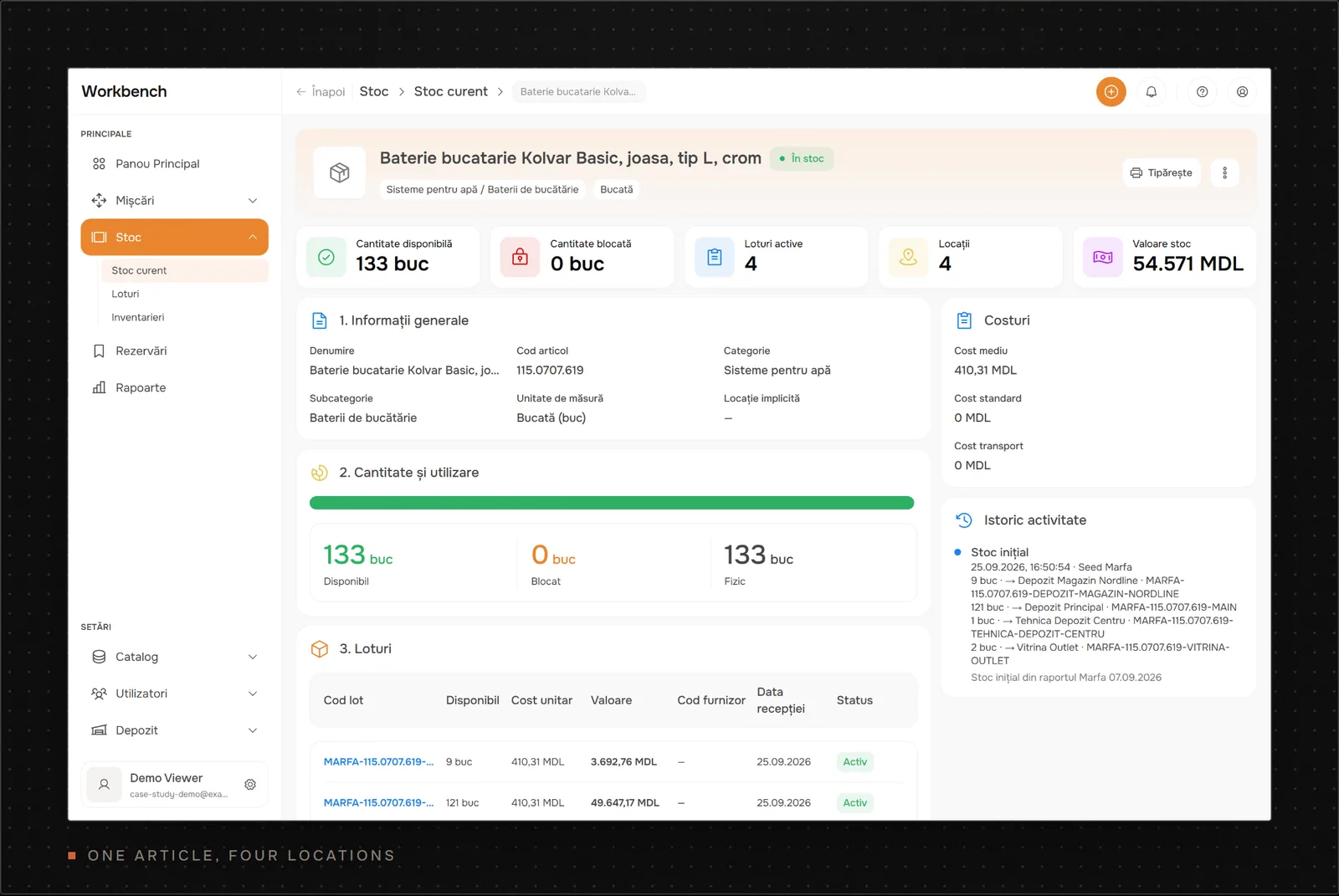
Stock was spread over eight places: two warehouses, a shop with its own stockroom, an appliance depot and three shop windows. The same mixer could sit in four of them at once. The accounting export listed a closing balance per item, but not which batch was where or what it cost.
Small things cost real money. When a customer reserved goods, the warehouse carried them to a separate corner so nobody would sell them twice. Stock counts left no record of what the books expected, so a difference found on the shelf was hard to explain afterwards.
The job was one inventory management system that the office and the warehouse could both trust, on desktop and on a phone.
Constraints
- One developer. I designed, built, migrated and operate it alone, so every moving part had to be something I can run and debug myself.
- Live data from day one. The opening stock came from the accounting system's own exports, with merged rows, mixed units and items without barcodes.
- Phones, not scanners. Warehouse staff scan QR codes and barcodes with a phone camera.
- Romanian-speaking users. The whole interface is in Romanian, including the error messages.
- A live database to move. Production had to switch to the new stock model without losing a product or a lot.
My Role
I did all of it: the domain model and schema, the API, the desktop and phone interfaces, the data imports, the production cutover and the support afterwards. All 149 commits in the repository are mine. The client's office staff and warehouse team told me how they work, tested each release on their real stock and reported what got in their way.
Key Decisions
One Stock Ledger, and Only One Function May Write to It
The first version stored a quantity on each product and gave each product one shelf. That fit the first demo and broke as soon as the same mixer had to live in the warehouse, the shop and a shop window at once.
I replaced it with a small, strict model. A product owns no stock. Locations form a tree of any depth, so a shop window and a warehouse shelf are the same kind of record. Current stock is a balance per product, location and optional lot. Every change is an immutable stock transaction with lines, and a database trigger rejects any update or delete on them. A mistake gets corrected by a second transaction, so the history always adds up to the current stock.
One function, postStockTransaction, is the only code allowed to change a balance. Receipts, phone scans, counts, take-outs, imports and seed scripts all call it. It locks the touched locations in a fixed order, refuses any line that would take a shelf below zero, and accepts an idempotency key, so a retried request replays the first transaction instead of booking a second one. The import scripts rely on that to be safe to rerun.
Every path into stock goes through that one function:
- Phone scans and take-outs
- Inventory counts
- Receipts and opening stock
- Import scripts
The cost is that every screen showing stock has to sum balances instead of reading one column, and I rewrote the stock pages around that. For the client, the payoff is a stock page that explains itself. Every number links back to the transaction that put it there.
Moving Live Data in Stages, With a Gate That Refuses to Skip a Step
Swapping the stock model under a running app was the riskiest part of the project. I split it into five tickets instead of one release: add the new tables beside the old ones, check every legacy location string against a reviewed mapping file, migrate the stock, switch reads and writes, and only then drop the old tables.
The cleanup migration refuses to run while old stock exists and no reconciliation has passed. The reconciliation compares totals per product, per lot and overall, and records the result. Drizzle runs pending migrations in one transaction, so a refusal leaves every old row in place.
Before touching production on 25 September 2026, I restored a copy of the live database and ran the whole runbook against it. That rehearsal produced the numbers the real run had to match: 8 pending migrations, 615 lots and 2,683.5 pieces of opening stock. The real run matched. The rollback plan was a database dump taken just before, restored into a scratch database to prove it worked, and the app stayed stopped until every check passed.
Blind Counts That Correct Stock on the Spot
A stock count is where trust in an inventory system is won or lost. The old tools let anyone overwrite a quantity, with no record of what the system expected, so a count erased its own evidence.
Now an admin starts a count for a location and every shelf under it. On the phone, a worker claims one location. The app snapshots the expected stock and blocks every other stock movement there until the location is finished. The worker scans each item and types the quantity found. The phone never shows the expected number, so the count isn't biased. Confirming a line corrects stock at once with its own transaction.
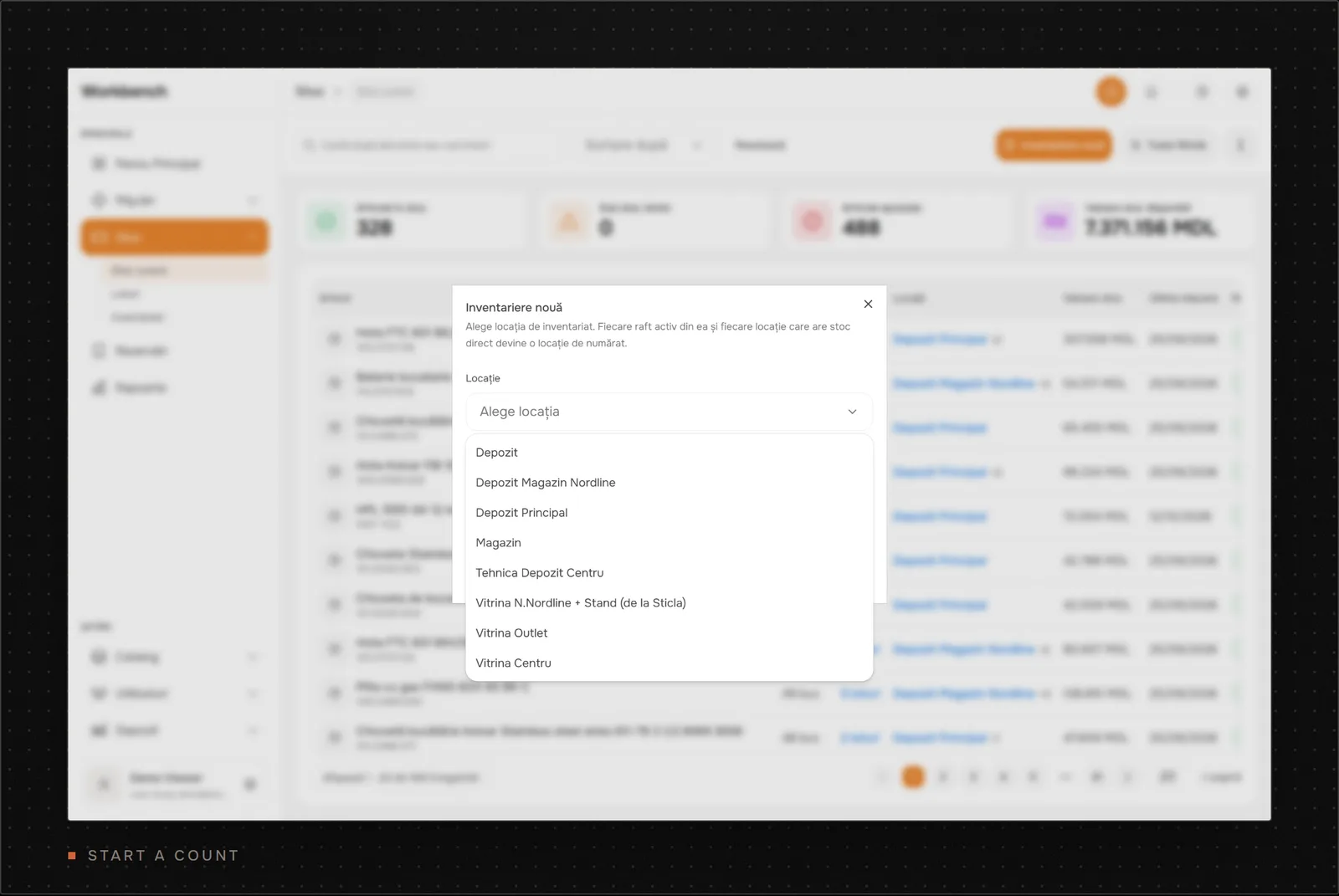
The hard part was lots. A worker counts one physical total and can't know which batch a missing unit came from. I wrote this up as an architecture decision record and chose a signed "unallocated quantity" per product and location. The physical total is correct right away, and an accountant assigns the difference to a lot later without applying it twice. I turned down two simpler options. Guessing the lot when only one exists would claim knowledge nobody gave the system, and a placeholder lot would leak into costs and traceability.
Real use pushed back fast. The day before the first full warehouse count, the client asked to finish a location with some lines left uncounted, because a few items had no scannable code. I added it before the count started. Those lines keep their system stock, post nothing, and show up as "left uncounted" for the admin.
How the Inventory Management System Works
Most of the daily work happens in three places: the catalogue, the stock list and the phone.
The catalogue. Products start as drafts and become final after a full review, which also creates their QR code. Large supplier and accounting files come in through import scripts with a dry run first. The biggest one turned a 1,463-row accounting report into 1,462 drafts and 1,453 lots. Two rows were the same cable and became one product. The generator checks every row against the report total and stops if anything differs. The lot values ended 9.18 MDL away from the report, all of it from rounding unit costs to four decimals, and 148 items went to the office for a manual check.
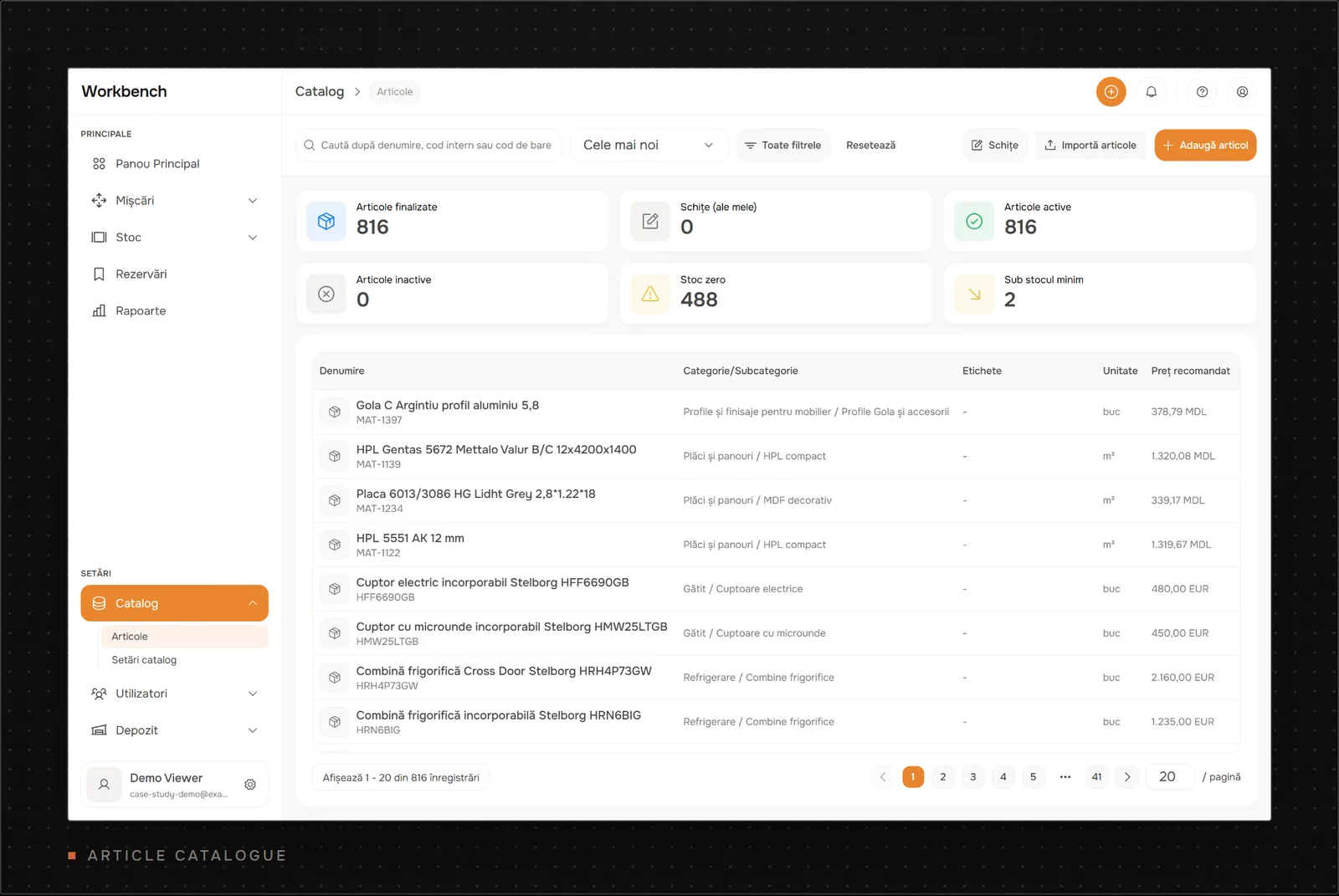
The stock list. Office staff see every product's available quantity, lots, locations and value in one table, sorted and filtered without exporting anything.
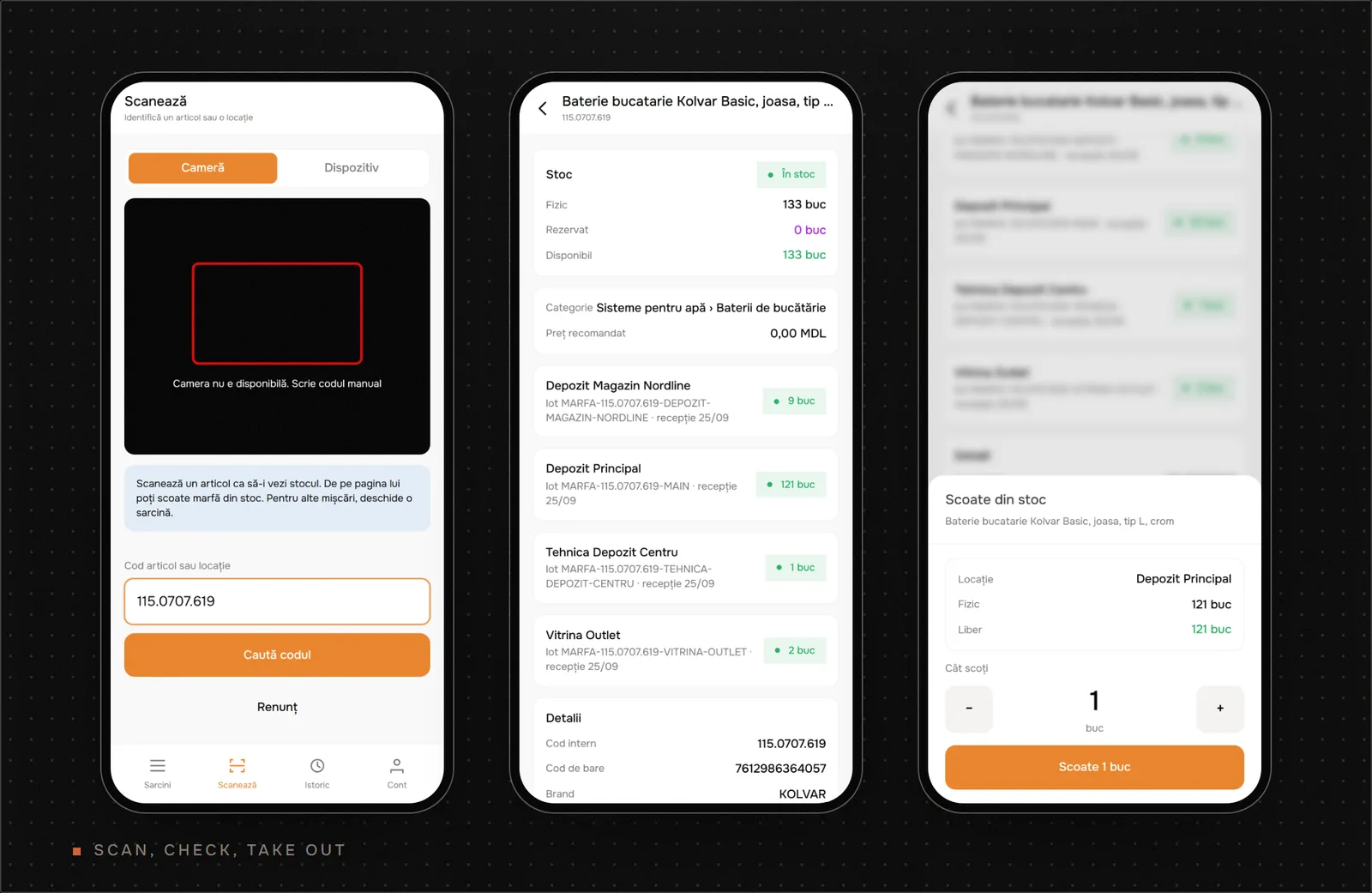
The phone. Warehouse staff scan a QR code, a barcode or the supplier code with the camera, or type it. The result shows stock per location and lot. Taking goods out is one short sheet, and if the free quantity is already reserved for a customer, the app asks which reservation the goods are for. That replaced the corner where reserved goods used to wait.
I built the web app with TanStack Start and React 19. The API runs on Elysia with oRPC, so the phone screens and the server share one typed contract. Data lives in PostgreSQL through Drizzle ORM, with 38 versioned migrations so far.
Results
The system replaced the accounting exports as the place where the client checks stock, and about 20 employees use it every day. I don't have timed before-and-after measurements yet. The rows below are production and repository facts, with the gaps marked.
- Where stock is checked. It used to be accounting exports and spreadsheets. Now it is one ledger for 8 locations, and every change is a transaction.
- Daily users. About 20 employees, reported by the client.
- Opening stock. 615 lines from an accounting export became 615 lots and 2,683.5 pieces, with a value equal to the report. Checked by a dry run and post-migration checks in the cutover runbook.
- Second import. A 1,463-row warehouse report became 1,462 products and 1,453 lots, with a 9.18 MDL rounding gap. The generator checks every row and the report total.
- Automated tests. 119 test files, about 700 test cases and 26 integration suites against PostgreSQL.
For the business, the useful change is that a count now ends with stock already corrected and a list of differences for the office.
What I'd Do Differently
I went through three stock models in three weeks of September. The first followed the demo screens, with zones, racks and shelves as fixed tables and one quantity column per product. The second added lots but kept their location as free text. The third is the ledger described above. The staged cutover made the last switch safe, but two of those models were avoidable. Next time I'd spend the first day mapping every physical place goods sit in, and every way they move, before writing a single table.
The first live counts also taught me something. Items without a barcode in the system couldn't be scanned, and a worker ended up sending 45 photos over chat for me to apply by script. Before scheduling a count I'd now run a barcode coverage report and fix the gaps first.
Work With Me
If your team still keeps stock in spreadsheets and accounting exports, I can look at how your goods move and tell you what a system like this would take. If you're hiring a senior full-stack developer who can own a product from schema to production, I'd like to hear about the role. I'm open to new projects. Get in touch.