Production Workflow System
A kitchen furniture maker in Moldova ran production through Viber chats and paper, across four sales locations and five workshop stations. I designed and built a production workflow system that follows each contract from the designer to assembly, working with a product designer who drew the screens. I also run it on two Hetzner servers with Coolify.
- 1663contracts tracked since October 2025
- 52619material lines checked by technologists and the warehouse
- 2Hetzner servers run the whole stack under Coolify
The Problem
A kitchen furniture maker in Moldova ran production through Viber chats and paper, so details got lost, deadlines slipped, and nobody could say which stage a kitchen was at without calling someone. Every order passes through a designer, a technologist, the warehouse and five workshop stations before it is assembled. The company sells from four locations, and each one fed the same workshop.
A designer would close a sale and pass the drawings and the hardware list on in a chat thread. The technologist reworked that list in another thread, and the warehouse checked stock against whichever version it saw last. The workshop learned about the job when someone printed it. When a panel came out of the saw 3 mm short, the worker had to find out who was responsible and phone them. That cost hours, and it cost missed delivery dates.
The client wanted to "go digital", but nobody had a picture of what that meant. My job was to turn that wish into a system the whole chain would trust.
Constraints
- No spec. The client knew the pain but not the product. The designer and I spent many hours in brainstorming sessions with the owners, walking through how a kitchen moves from the showroom to the installer, before I wrote the first table.
- One engineer. I write the code, run the servers and answer the phone when something breaks. Every piece of the stack had to be something I can debug alone.
- The data stays in-house. Customer contracts, phone numbers and photos of their homes live on servers we run, not in a third-party SaaS.
- The workshop floor. Workers read the app on tablets between machines. Their screen needed one job per card, large touch targets and nothing they have to type.
- Requirements that kept moving. Stages, roles and locations changed after launch. New locations were added in May and June 2026, and in October 2026 the client asked for the workflow to be enforced stage by stage.
My Role
Two of us built this. A product designer sat with the client, collected requirements and drew the screens. Everything technical was mine: the domain model, the PostgreSQL schema and its 10 migrations, the API, the web app for desktop and tablet, the print layout, the notification pipeline, and the two servers it runs on. I wrote 239 of the repository's 240 commits.
Architecture at a Glance
The whole system is one Bun monorepo with two apps and two shared packages. Coolify deploys it to a Hetzner server that also hosts PostgreSQL, MinIO for file storage and Gotenberg for PDFs. A second, smaller server only builds images, and database backups go to Cloudflare R2. Notifications leave through a Telegram group and Resend email.
The monorepo is small on purpose:
apps/web                    Vite SPA: React 19, TanStack Router, Query, Form, Table
apps/server                 Hono + tRPC API, Drizzle schema and migrations, Better Auth
packages/shared-types       zod schemas and types both apps import
packages/telegram-notifier  send-only Telegram client with its own tests
Each pick, and what I picked it over:
| Layer | Choice | Over | Why |
|---|---|---|---|
| Runtime and repo | Bun + Turborepo | Node + pnpm | One tool runs, installs and hot-reloads the API. Turbo caches type checks across the four packages. |
| API | Hono + tRPC 11 | REST with OpenAPI, Express | The web app is the API's only consumer, so a typed client beats a published contract. Hono speaks web-standard Request, so Better Auth mounts in one line and the tRPC adapter is official. |
| Validation | zod + drizzle-zod | Hand-written DTOs | Insert schemas come straight from the Drizzle tables and live in shared-types, so the form and the server reject the same input. |
| Database | PostgreSQL + Drizzle ORM | Prisma, a hosted DB | The schema is TypeScript in one folder, and migrations are plain SQL I can read before they run. |
| Frontend | Vite SPA, TanStack Router | Next.js, TanStack Start | It sits behind a login and nobody searches for it, so server rendering buys nothing. The build is static files. Routes and search params are typed, and filters live in the URL. |
| Auth | Better Auth | Clerk, Auth0 | Users, sessions and roles stay in the same PostgreSQL. New accounts wait for admin approval, and password reset uses emailed one-time codes. |
| Files | MinIO over the S3 API | AWS S3, Cloudflare R2 | 8,699 attachments, 3.4 GB of customer kitchen photos, stay on the client's server. The browser uploads through presigned URLs, so files never pass through the API. Moving to R2 later is a config change. |
| PDFs | Gotenberg | Puppeteer inside the API, react-pdf | Chromium lives in its own container instead of bloating the API image, and it prints the same React components the app shows. |
| Hosting | Coolify on Hetzner | Vercel + Supabase, Railway | One flat monthly bill, data on EU servers we control, and long-running containers like Gotenberg are first-class. |
Key Decisions
Self-Hosting Everything on Two Hetzner Servers With Coolify
A hosted stack would have meant Vercel for the web app, a managed Postgres, S3 for photos and a separate home for a headless browser. That is four vendors and four bills that grow with every photo a designer uploads. The client also wanted their customers' data on infrastructure they own.
I put the whole system on Coolify. The production server is a Hetzner CPX42 in Helsinki and runs PostgreSQL, MinIO, Gotenberg, the API and the web app as separate containers. A second, smaller CPX31 is a dedicated Coolify build server. Builds compile TypeScript and install dependencies, and running them on the production box would have competed with live users for CPU and memory. Now production only pulls finished images. A push to master triggers the build and the deploy, so releasing is a git push.
Coolify runs scheduled PostgreSQL backups to Cloudflare R2, so a copy of the data lives off the box and with another provider. The database is only 24 MB after a year of daily use. The weight sits in the photos.
The cost is that I am the ops team. Disk space, container updates and certificate renewals are my job, and there is no vendor to page at night. For one company, one region and around 25 active users a month, that trade is cheap. Every service is a plain container, so the whole system can move to another host without a rewrite.
End-to-End Types With tRPC, Drizzle and a Shared Package
The web app is the only client of the API, so I didn't need a public contract. tRPC lets the React code call contracts.createContract as a typed function, and a renamed field fails the build in both apps at once. Deadlines are Date objects everywhere because superjson carries them over the wire, which matters in an app built around due dates.
Validation is the other half. Drizzle defines the tables, drizzle-zod derives insert schemas from them, and packages/shared-types narrows those into the shapes each form sends. A draft contract only needs a title, while a published one needs a client, a number, a deadline and a location. One zod union expresses that rule, and both the form and the API run it.
The trade-off is lock-in to TypeScript on both ends. If the client ever wants a native app or a partner integration, I'll put a small REST layer in front of the same procedures.
Stage Windows Worked Out Backwards From the Deadline
A kitchen has one date the customer cares about, the installation deadline. The workshop has five stations, each needing a few days. Instead of asking an admin to plan every stage by hand, the app counts back from the deadline. Cutting opens 21 days out, edge banding 19, drilling 16, packing 13 and assembly 10, and each stage has its own due date two or three days later.
A worker's tablet shows only the contracts whose stage is open, sorted by time left, with urgent orders pinned on top. A worker claims a contract before starting, so two people never cut the same kitchen. The database enforces that rule, not the UI:
// worker_claim has a composite primary key (contract_id, worker_type).
const inserted = await db
  .insert(workerClaim)
  .values({ contractId, worker_type: stage, worker_id: user.id })
  .onConflictDoNothing()
  .returning();

if (inserted.length === 0) {
  // someone else holds this stage: tell the worker who
}
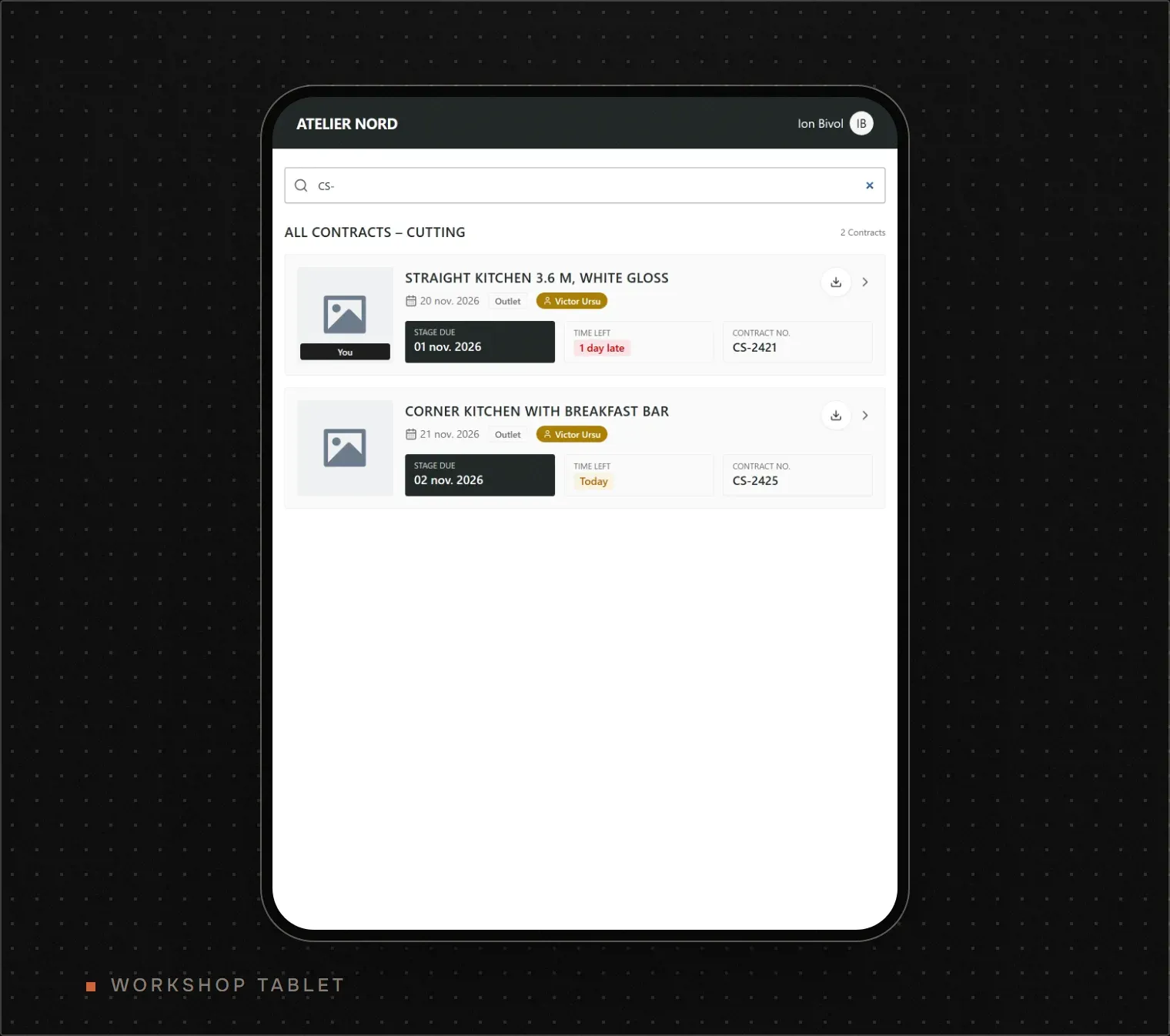
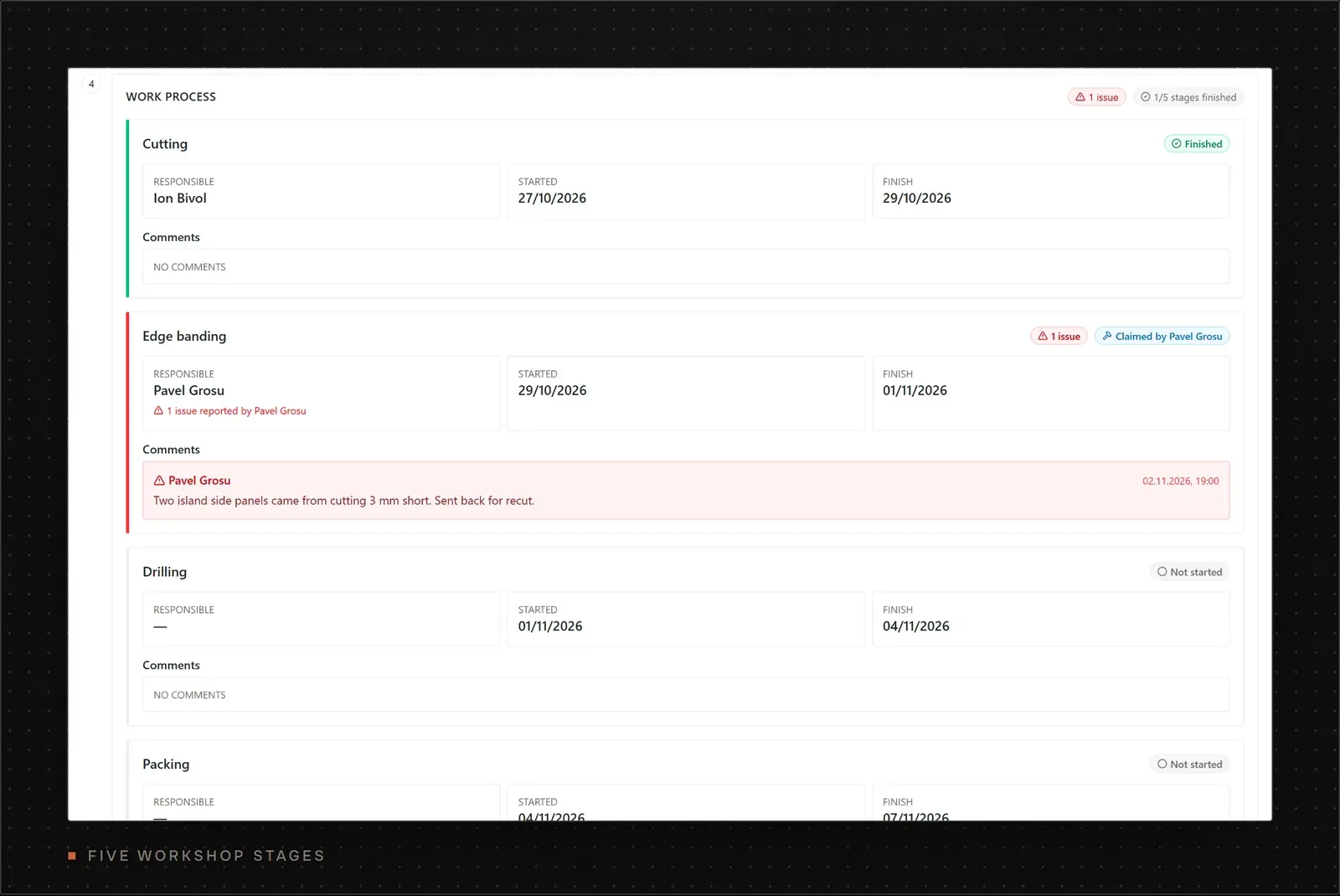
Until October 2026 the order of stages was a convention the UI followed. The client asked for it to be strict, so the API now refuses to open a stage until the technologist has finished and the previous station has logged its finish. A stage shows up on a tablet only once the work before it is done.
PDFs Printed by Gotenberg From the App's Own Page
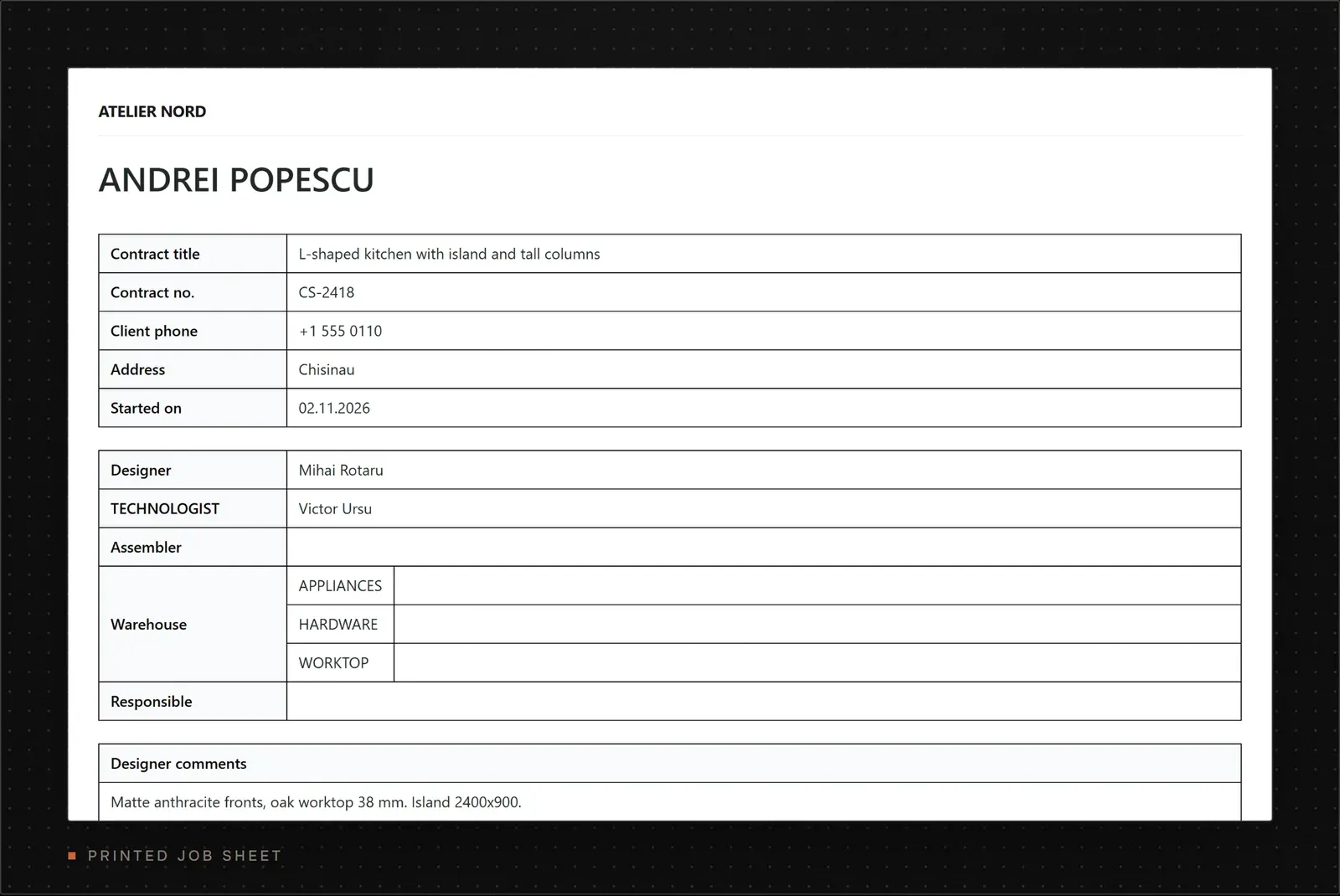
The workshop still runs on paper at the saw, so every contract needs a printable job sheet. I didn't want a second layout language for it. React-pdf would have meant rebuilding every table in its own primitives, and running Puppeteer inside the API would have put a full Chromium inside the API image.
So the web app has a print route that renders the job sheet with the same React components and Tailwind classes as the screen. When someone downloads it, the API asks Gotenberg, a container that wraps headless Chromium, to load that page and return a PDF. Gotenberg sits behind basic auth and waits five seconds so attachment photos finish loading before it prints.
The cost is one more container to run and a five-second wait per document. In return, a change to the materials table shows up on screen and on paper in the same commit.
Notifications That Never Block the Action That Caused Them
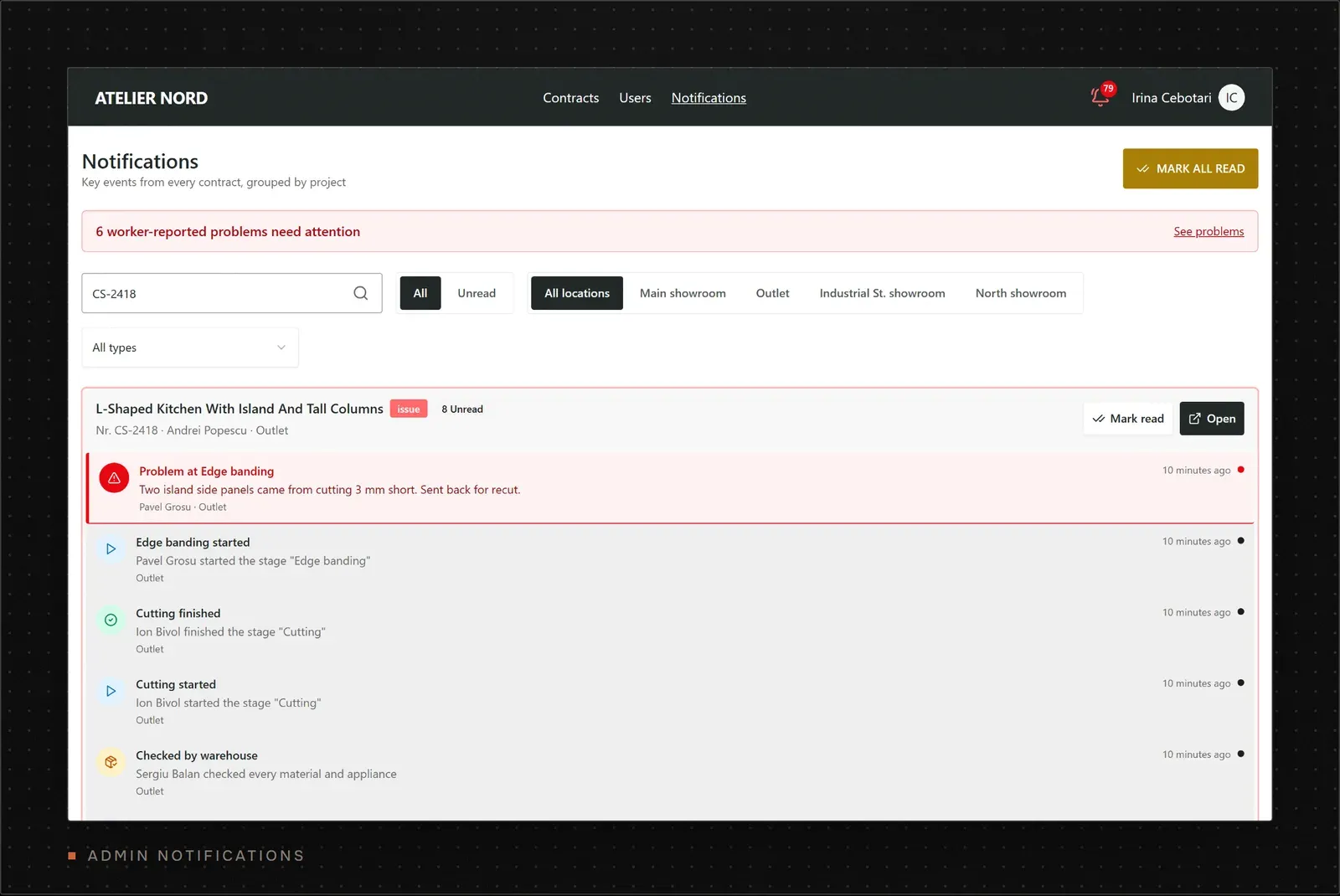
When a worker reports a problem, the admin should know within seconds, and the admins already follow a Telegram group. So every key event writes an in-app notification row and forwards a message to that group. The API doesn't await the forward. If Telegram is slow or down, the worker's "report problem" button still answers at once, and the failure lands in the logs.
The Telegram client is its own package with its own tests. It sends only, with no polling or webhook. It turns into a no-op when credentials are missing, so local setups need no bot, and it retries through Telegram's rate limits instead of dropping messages.
How the Production Workflow System Works
A contract moves through the same app on every device, and each role sees its own slice of it.
- The designer creates the contract as a draft, attaches renders and drawings in a drag-to-reorder list, picks hardware from a catalog of 163 items, then publishes it.
- The technologist reviews one merged checklist. Designer items carry a DES mark and their own additions a TEH mark, so they can see who asked for what. They correct quantities, add what's missing and finish the technical stage.
- The warehouse ticks every material and appliance as checked against stock.
- Workshop stations claim, finish or report problems from a tablet, stage by stage.
- An admin or the technologist closes the contract once assembly is done.
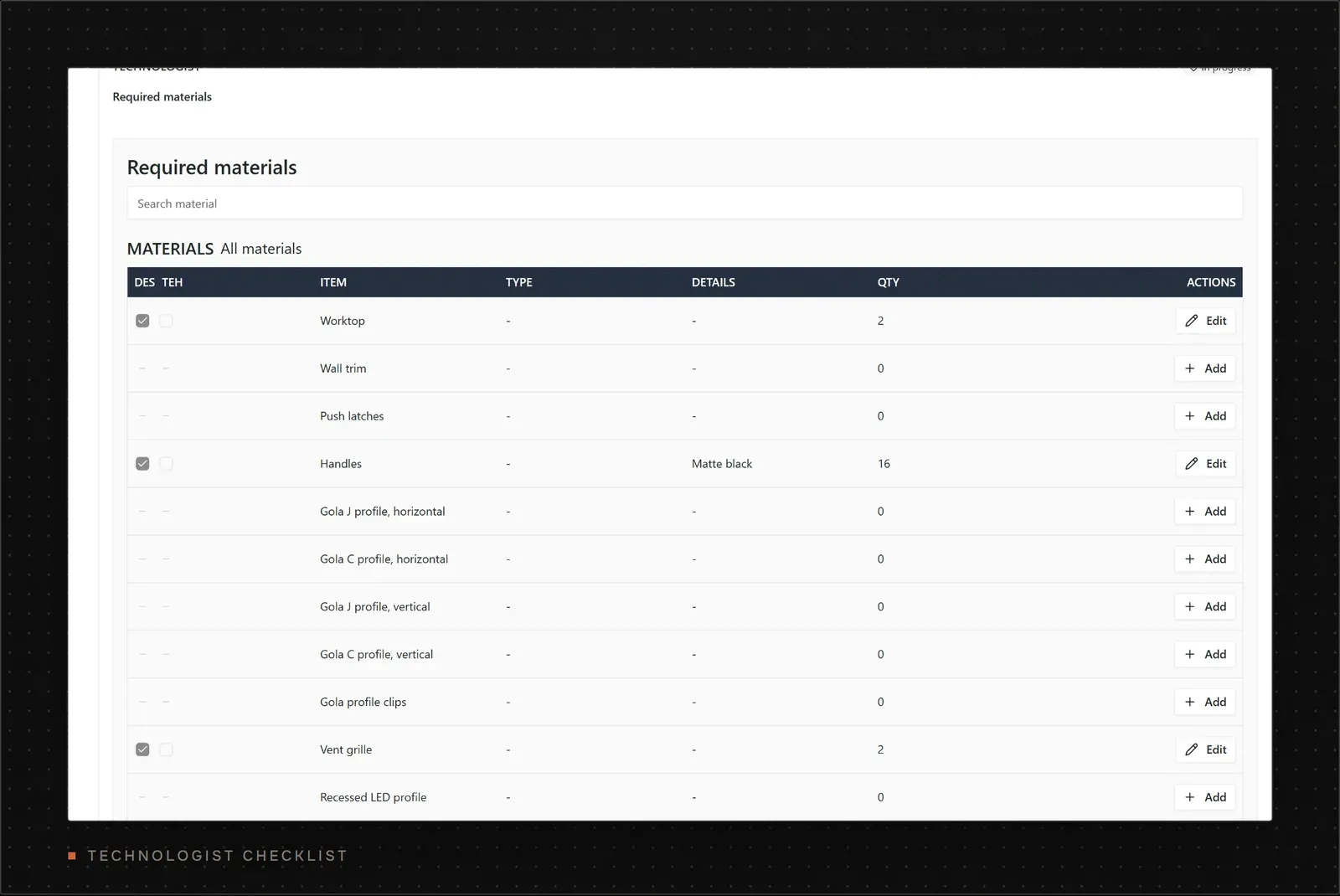
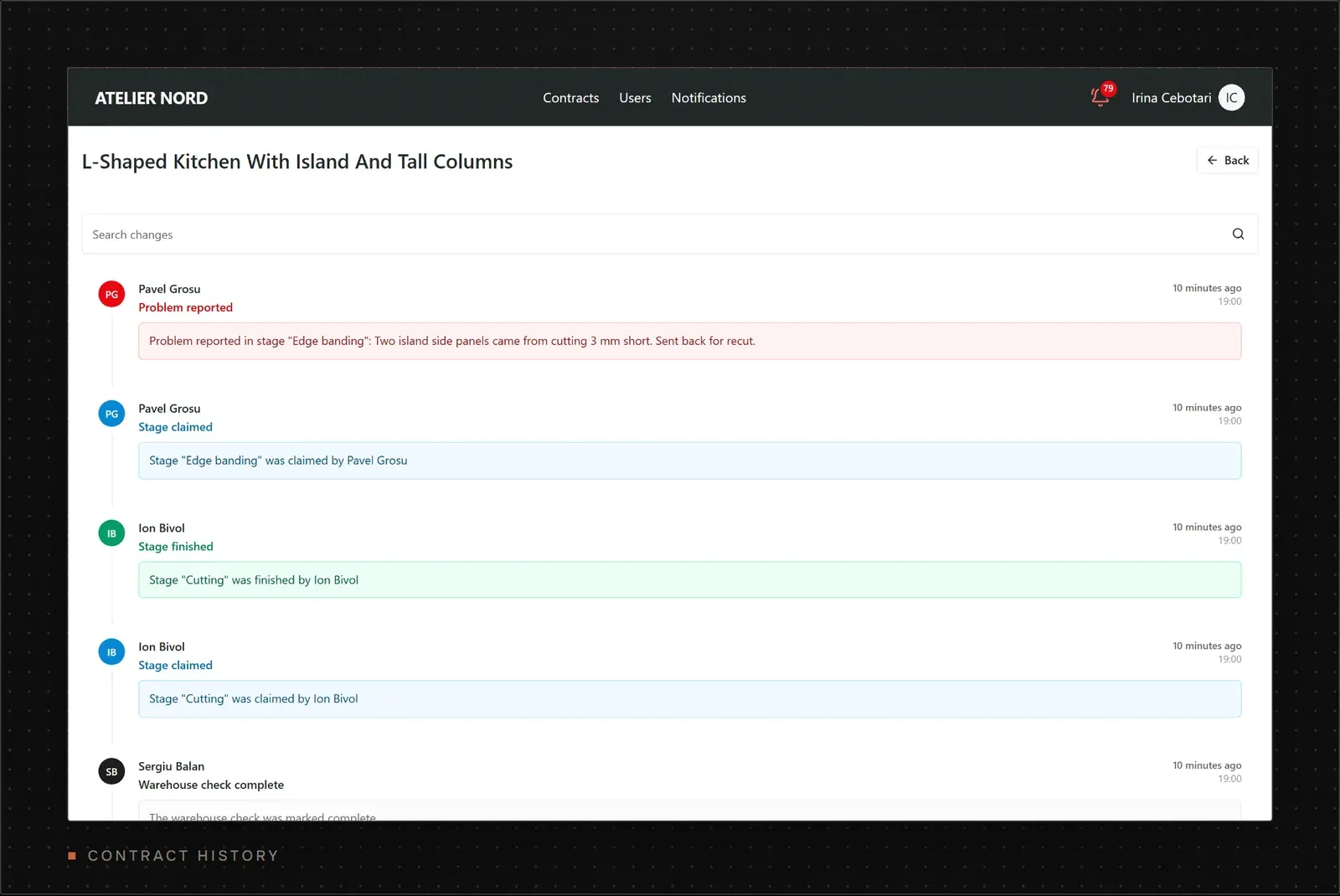
Every save writes a human-readable history entry built from a diff of what changed. There are 12,263 of them so far. When a customer calls about a missing handle, the office can see who removed it and when.
Results
The app replaced the Viber threads as the place where a contract lives. The figures below come from read-only counts on the production database on 2 November 2026.
| Measure | Before | Now | How it was measured |
|---|---|---|---|
| Where a contract lives | Viber threads and paper | One record per contract, with its history | Production database |
| Contracts tracked | Not tracked | 1,663 since 6 Oct 2025, 1,336 of them closed | Rows in contract |
| Monthly volume | Not tracked | 77 to 190 new contracts a month | Contracts grouped by month |
| Material lines reviewed | Lists in chat messages | 52,619 designer and technologist lines | Rows in the two material tables |
| Change history | None | 12,263 history entries | Rows in history_log |
| Files | Phone galleries | 8,699 attachments, 3.4 GB on MinIO | Attachment rows and stored sizes |
| People using it | Not applicable | 43 accounts, 24 active in the last 30 days | User and session tables |
I don't have timed before-and-after numbers for how long it takes to find a contract's stage. I didn't measure that before launch, and I won't guess. What changed on the floor is visible in the data, though. A worker with a short panel presses one button, and the admin sees it in Telegram with the contract and the stage attached, instead of being tracked down by phone.
What I'd Do Differently
Image rotation taught me to test native dependencies in the production build before shipping them. Designers upload kitchen photos straight from their phones, and many came in sideways. On 8 November 2025 I added server-side rotation with sharp. Two days later I removed sharp and switched the feature off, and on 20 November I shipped rotation again with Jimp, which is pure JavaScript.
Jimp is slower than sharp, but rotating one photo on demand is not a hot path, and a dependency with no native binary can't break a deploy. The real lesson is about process. A feature reached users before I had built it on the same image production runs. Now anything with a native addon gets a test build on the build server before it gets a release.